Paperform Alternative: Simple, Beautiful Forms for Less with BeeForm
Why People Look for a Paperform Alternative
Paperform is a capable platform. It combines forms with payments, e-signatures and workflow automation, and its forms can look very polished. People start looking for a Paperform alternative when they only need the forms part: a beautiful, branded form, plenty of responses, and a price that does not start at $49 a month.
BeeForm is an online form builder and form designer focused on exactly that, with unlimited forms and unlimited responses on every plan, including Free. This guide compares the two honestly, including the many places where Paperform does more than BeeForm.
What BeeForm Is
BeeForm lets you build, design, publish and manage forms in one place. Every plan, including the Free plan, has unlimited forms and unlimited responses, with no time limit and no card needed. It also works with Google Forms: the BeeForm add-on restyles forms you already have.
1. Unlimited Responses on the Free Plan
Paperform's pricing page lists 30 submissions a month on its Free plan. Its paid plans have unlimited submissions, subject to a fair use policy. A free Paperform account is a good way to try it, but a form with real traffic outgrows it quickly.
BeeForm does not count responses against your plan. The Free plan collects as many as your forms receive. If you want a limit, you set it yourself on a form, as described in section 3.
2. Close Forms Automatically, Even on Free
Paperform lists auto-close by number of submissions and by date, along with a custom message for closed forms, as features of its paid plans. BeeForm includes them on every plan.
Open Settings, then Limits and schedule. You get two independent switches, and you can use one or both:
- Limit the number of responses: the form closes automatically once that many responses arrive.
- Close the form on a date: pick a date and time, shown in your local time.
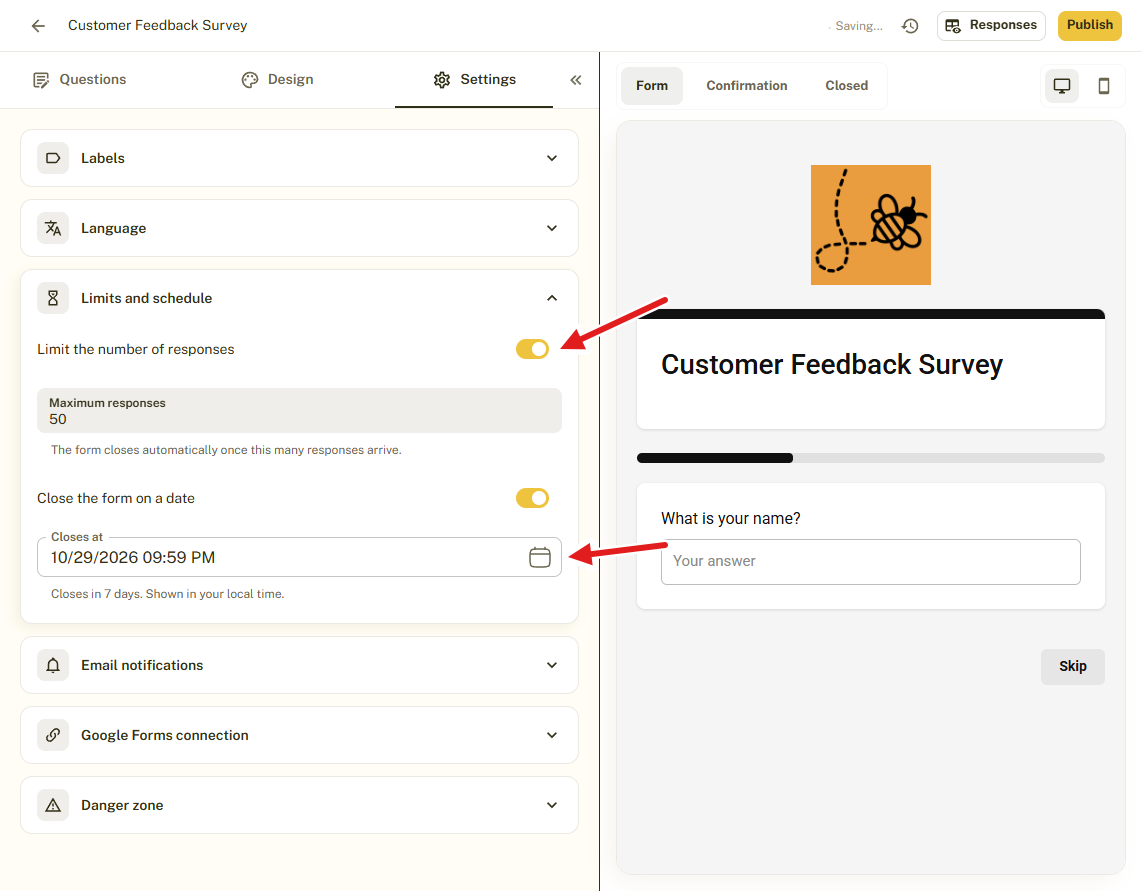
This suits event seats, first-come offers and applications with a deadline. You also write the message late visitors see, using the Closed page. Read How to Set a Response Limit or Closing Date.
3. Themes and Branding You Can Reuse
BeeForm starts from a gallery of designed themes, filtered by Default, Premium and Workspace themes and by styles such as Bold and Business. You preview a theme on your own form before you apply it, and your questions, logo and messages are kept.
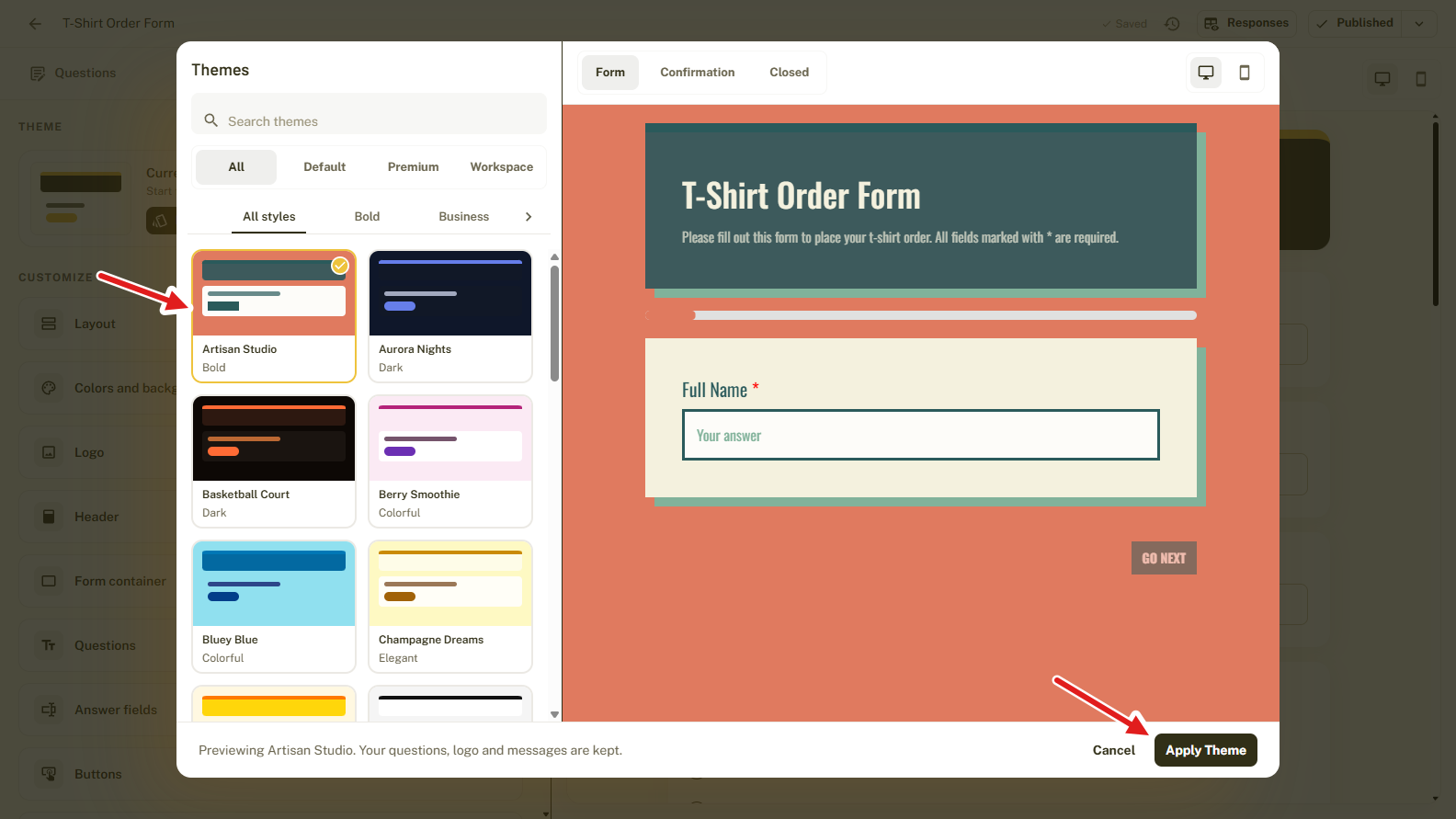
The Design tab then lets you fine-tune the Layout, Colors and background, Logo, Header, Form container, Questions, Answer fields and Buttons. Type exact hex codes, choose a font, and upload a background image (PNG, JPEG, WebP or GIF, up to 5 MB).
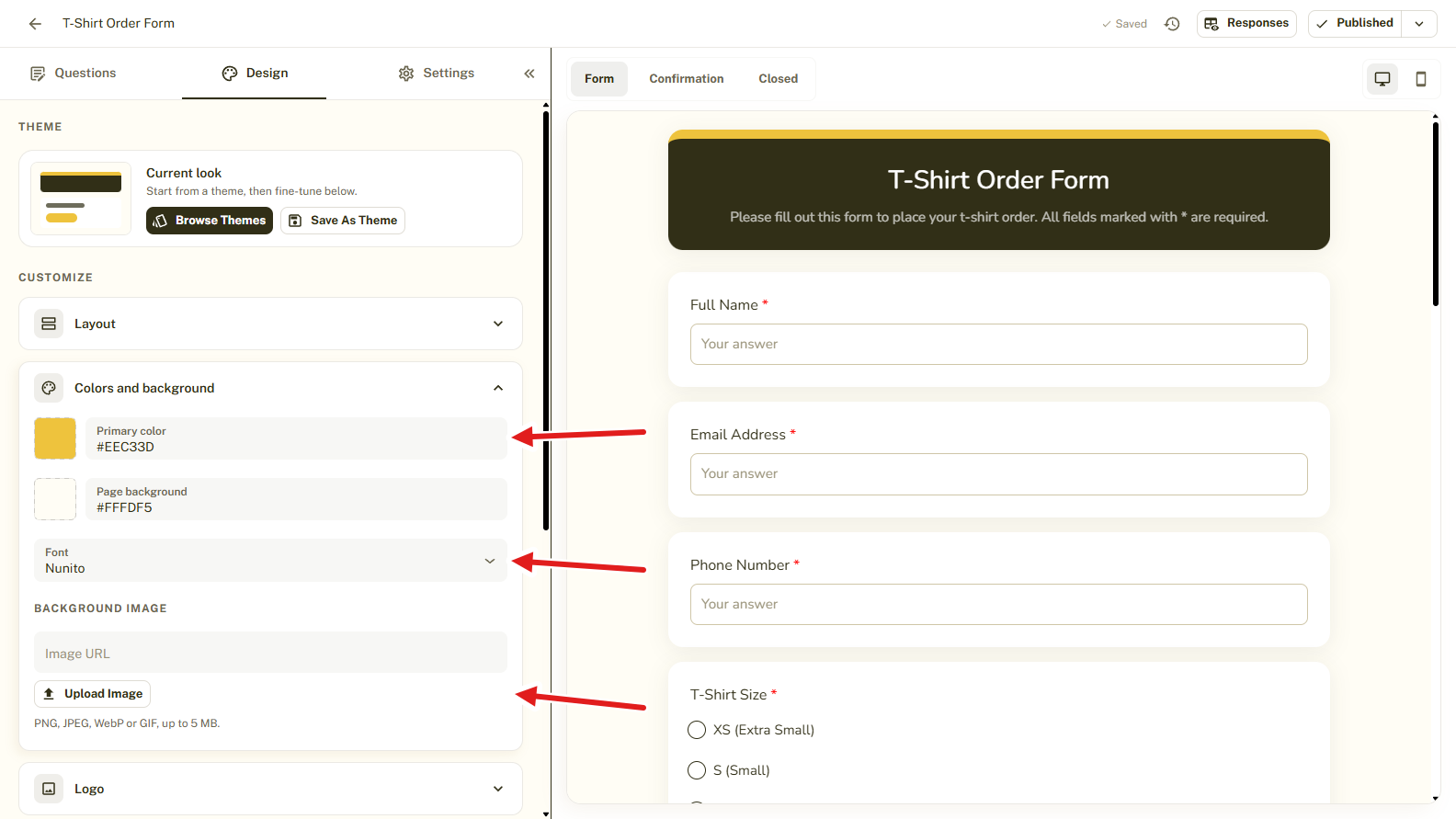
Click Save as theme and every new form can start on-brand. Pro adds a custom logo and header, premium themes, unlimited saved themes and the option to remove BeeForm branding. Paperform's free forms carry a Paperform badge that its paid plans remove. See How to Choose a Theme in BeeForm.
4. Wizard Mode for Long Forms
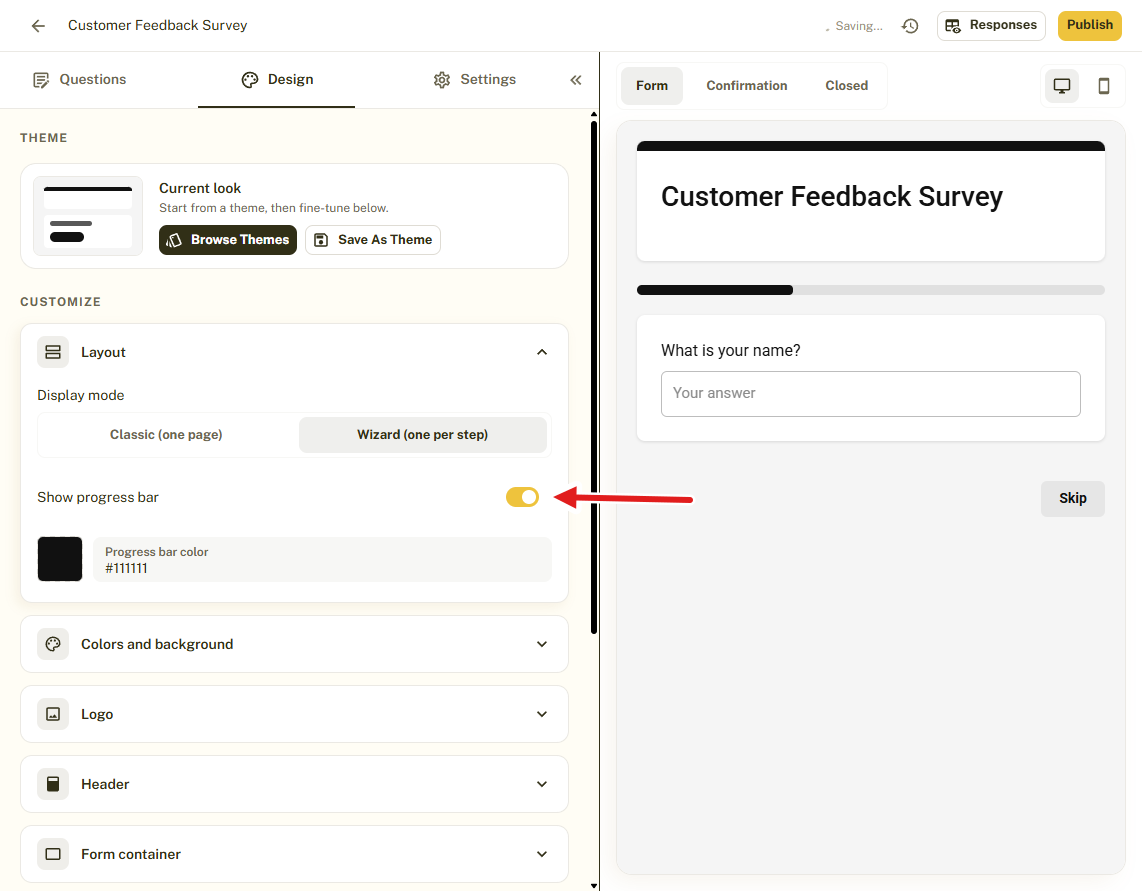
Both tools offer a one-question-at-a-time experience. In BeeForm, go to Layout and set Display mode to Wizard (one per step), or keep Classic (one page).
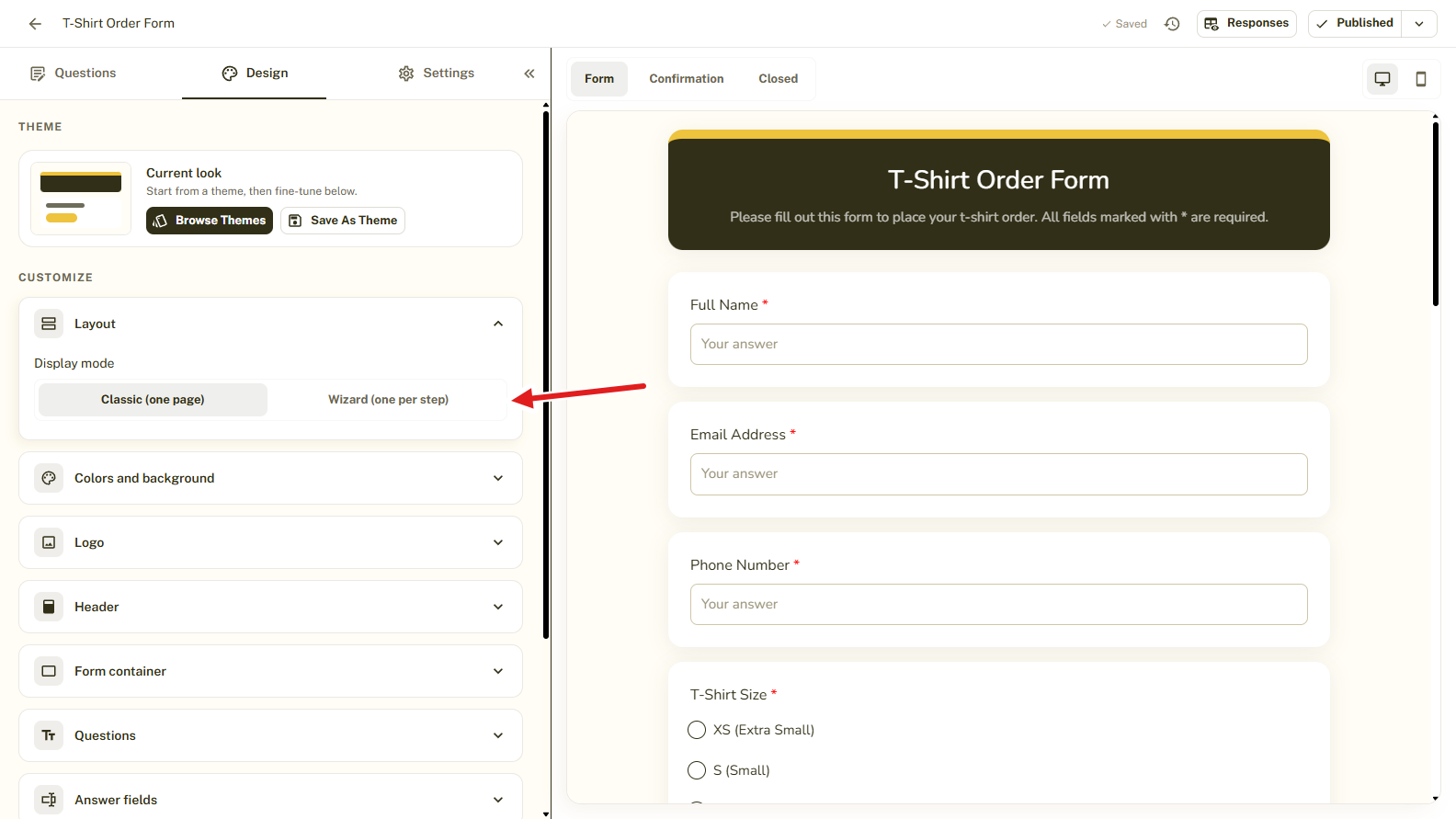
You can turn on a progress bar and choose its color. Respondents move with Back and Next, the last step shows Submit, and optional questions get a Skip button. Wizard mode is available on the Free plan.
5. Analytics, Alerts and Exports
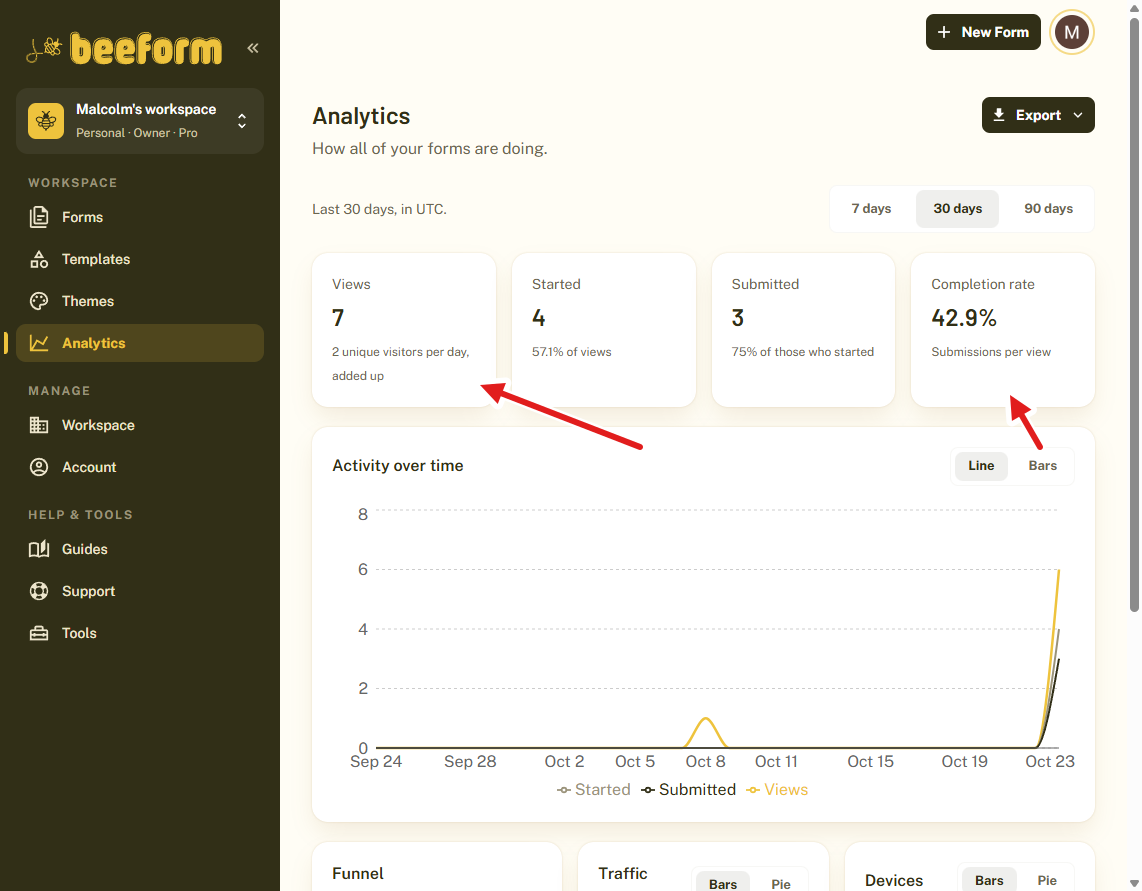
With Analytics (Pro, with 90 days of history) you see Views, Started, Submitted and the Completion rate over 7, 30 or 90 days, plus the funnel, the Traffic sources and the Devices people use. A form's own Analytics tab also shows which questions people stop at. Paperform also offers drop-off analytics, on its paid plans.
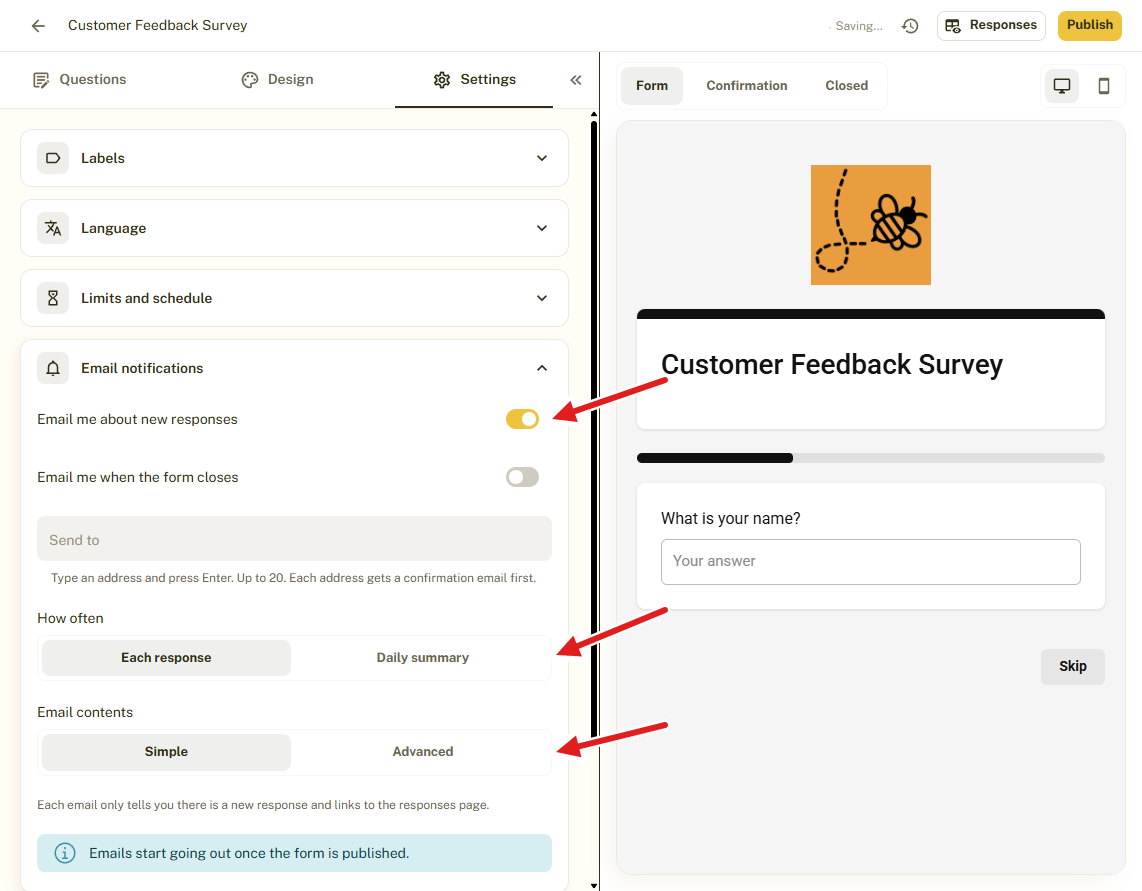
BeeForm email alerts (Pro) go to up to 20 addresses, each confirmed first. Choose an email for each response or one daily summary, and an email when the form closes.
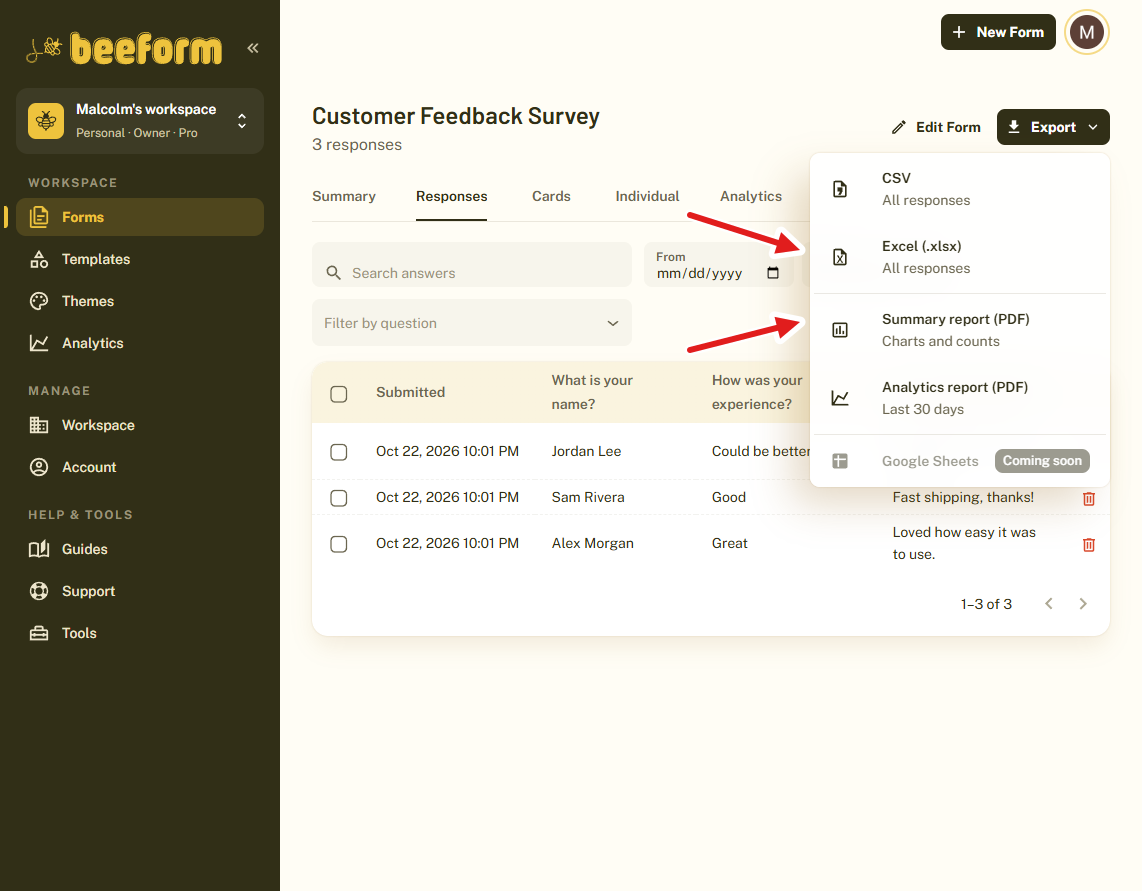
The Export menu offers CSV, Excel (.xlsx), a Summary report (PDF) with charts and counts, and an Analytics report (PDF). Excel export and response reports are included in the Free plan.
6. Teams Without Per-Member Pricing
Both tools let you add team members without paying per seat. BeeForm Pro and Business have shared team workspaces with roles, unlimited workspaces and unlimited members. Business also adds form version history. On Paperform, multiple workspaces for brands or clients start on its Business plan.
Free Tools to Plan Your Survey
Whichever form builder you choose, a few free BeeForm tools help you plan and read the results. None of them need a sign-up:
- Survey sample size calculator: find how many responses your survey needs for reliable results, before you send it.
- CSAT calculator: turn satisfied and total responses into a customer satisfaction score.
- NPS calculator: turn promoters, passives and detractors into a Net Promoter Score.
You can browse them all on the free tools page.
BeeForm vs Paperform: Feature Comparison
Here is every feature covered in this guide side by side. Features marked (Pro) need BeeForm's Pro plan. The Paperform column is based on Paperform's public pricing page.
| Feature | BeeForm | Paperform |
|---|---|---|
| Unlimited forms | ✓ | ✓ |
| Unlimited responses on the Free plan | ✓ | ✗ |
| One question at a time layout | ✓ | ✓ |
| Theme gallery and reusable saved themes | ✓ | ✓ |
| Remove branding on a paid plan (Pro in BeeForm) | ✓ | ✓ |
| Close automatically after a number of responses on the Free plan | ✓ | ✗ |
| Close automatically on a date on the Free plan | ✓ | ✗ |
| Views, starts and drop-off analytics (Pro) | ✓ | ✓ |
| Email alerts to up to 20 confirmed addresses (Pro) | ✓ | ✗ |
| CSV and Excel export | ✓ | ✓ |
| Unlimited team members | ✓ | ✓ |
| Custom HTML and CSS | ✗ | ✓ |
| Conditional logic | ✗ | ✓ |
| Calculations and scoring | ✗ | ✓ |
| Payments and product sales | ✗ | ✓ |
| E-signatures | ✗ | ✓ |
| Workflow automation | ✗ | ✓ |
| 9,800+ integrations through direct apps, Zapier and Make | ✗ | ✓ |
When Paperform Is the Better Choice
Paperform is a much broader platform, and a fair comparison says so:
- If your form needs conditional logic, calculations or scoring, Paperform has them and BeeForm does not yet.
- If you want to take payments, sell products or run subscriptions in a form, Paperform supports Stripe, PayPal, Square and Braintree, with no transaction fees from Paperform.
- If you need e-signatures or workflow automation, Paperform includes Papersign and Stepper on every plan.
- If you rely on a long list of integrations, Paperform connects to more than 9,800 tools through direct apps, Zapier and Make.
- If you want custom HTML and CSS, a custom domain, or SSO, those are on Paperform's paid plans.
If you mainly need clean, branded forms for lead capture, registrations, applications or surveys, and you do not need payments or logic, BeeForm does that for much less.
Pricing
The Free plan has unlimited forms and responses, wizard mode, response limits, file uploads up to 10 MB, advanced design controls, Excel export, response reports and up to 10 saved themes. Pro is $18 per month and adds analytics, branding removal, a custom logo and header, premium themes, email alerts, team workspaces and priority support. Business is $29 per month and adds form version history, 1 GB file uploads and 2-year file retention. Paying yearly takes 20% off the monthly price. There is no free trial because the Free plan is the trial.
For comparison, Paperform's pricing page at the time of writing lists Pro at $49 per month billed annually ($59 month to month) and Business at $124 per month billed annually ($149 month to month), with a 7-day free trial of the paid plans and a Free plan limited to 30 submissions a month.
How to Get Started
- Sign up for free at BeeForm with Google or email.
- Click New form and choose a blank form or a template.
- Open the Design tab, click Browse themes and apply one.
- Open Settings to add a response limit, a closing date and email alerts.
- Click Publish and share your link.
Tips and Best Practices
- Start from a template when you are short on time, then change the questions and design.
- Use Wizard mode for long forms and Classic mode for short ones.
- Save your branded design as a theme so every new form starts on-brand.
- Check how many responses you need with the free sample size calculator before you share the form.
Common Pitfalls to Avoid
- Analytics, email alerts, a custom logo, premium themes and branding removal need the Pro plan.
- BeeForm does not have conditional logic, payments or e-signatures yet. Check that your form does not depend on them before you move.
- Forms and responses are not imported from Paperform, so export your submissions before you cancel.